Drive Better Execution.
The Simple and Smart Execution Platform Built To Turn Strategy into Results.
Futureworks connects strategy, OKRs, priorities, and meetings in one shared workspace, so the entire organization moves in the same direction and knows what matters right now.
No credit card required. Start small and scale when ready.
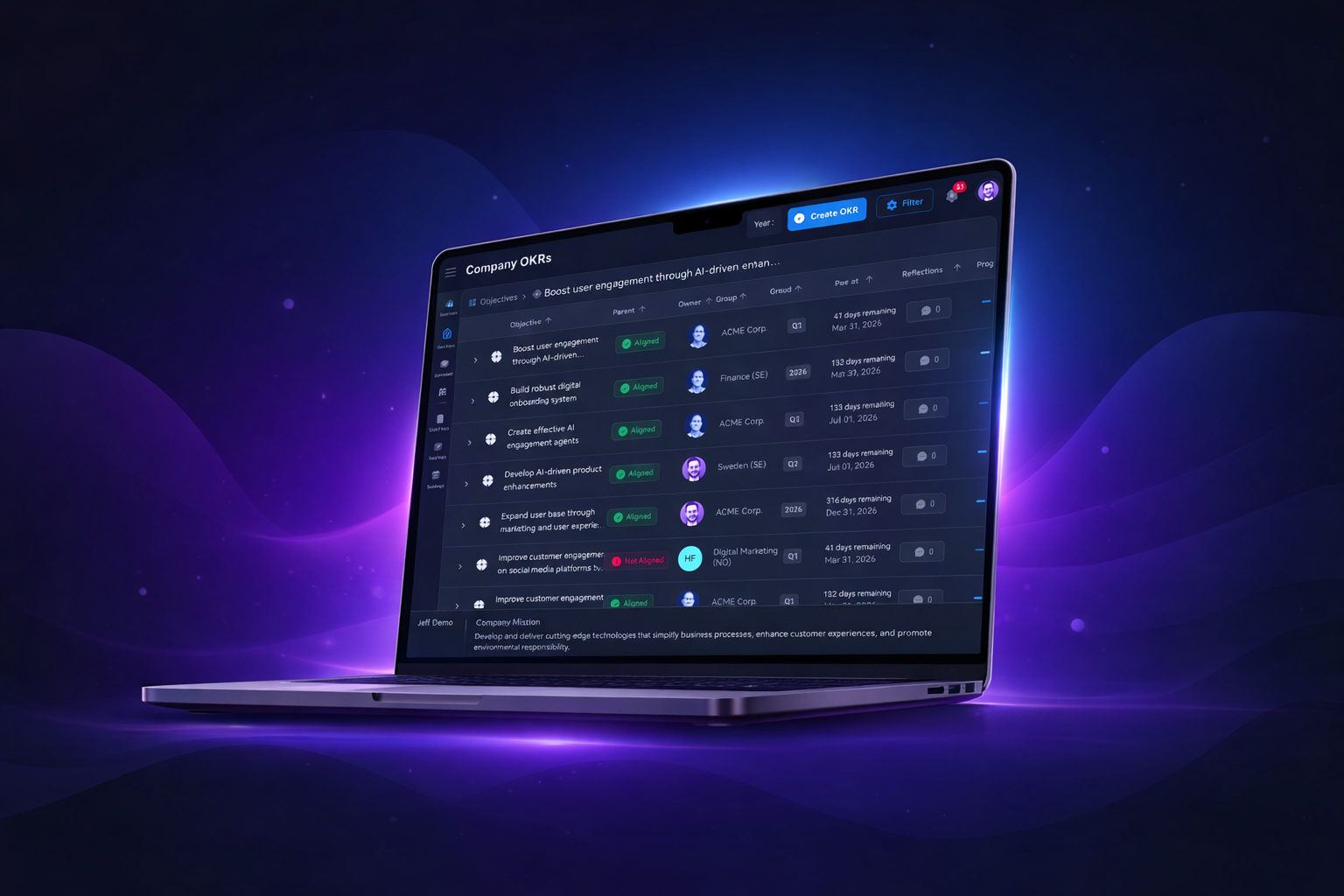
Succeed with OKRs. Succeed with Futureworks.
One platform for strategy, OKRs, priorities, and meetings.
"Futureworks helped us turn OKRs into real transparency and measurable progress."
— Andreas Rafaelsen, Department Director, Norwegian Digitalisation Agency (DigDir)
Trusted by leading organizations


%20--%3e%3csvg%20version='1.1'%20id='Layer_1'%20xmlns='http://www.w3.org/2000/svg'%20xmlns:xlink='http://www.w3.org/1999/xlink'%20x='0px'%20y='0px'%20viewBox='0%200%20191.2%20121.5'%20style='enable-background:new%200%200%20191.2%20121.5;'%20xml:space='preserve'%3e%3cstyle%20type='text/css'%3e%20.st0{fill:%23002E52;}%20%3c/style%3e%3cg%3e%3cpath%20class='st0'%20d='M174.4,20.6h-8.3v18.2h-10.6v7.1h10.6V87c-0.1,5.3,0.9,9,3,11c2,2,5.6,3,10.7,3c1.1,0,2.2,0,3.3-0.1%20c1.1-0.1,2.2-0.1,3.3-0.1h0.4v-7.1l-0.5,0.1c-2.1,0.2-4.2,0.4-6.3,0.4c-2.5-0.1-4.1-0.8-4.6-2.1c-0.6-1.3-1-3.2-1-5.5V45.9h12.4%20v-7.1h-12.4V20.6z'/%3e%3c/g%3e%3cg%3e%3cpath%20class='st0'%20d='M114.8,76.1c-0.5,3.7-1.9,6.6-4,8.8c-2.1,2.1-5.1,3.2-8.9,3.2c-2.5,0-4.6-0.6-6.4-1.7%20c-1.7-1.1-3.1-2.6-4.2-4.4c-1-1.8-1.8-3.8-2.2-6c-0.5-2.2-0.7-4.5-0.7-6.6c0-2.2,0.2-4.5,0.7-6.8c0.5-2.3,1.3-4.3,2.4-6.2%20c1.1-1.9,2.5-3.4,4.3-4.6c1.7-1.2,3.9-1.7,6.5-1.7c7,0,10.9,3.3,11.9,10.1l0.1,0.4h17.2l0-0.5c-0.2-4-1.2-7.5-2.9-10.4%20c-1.7-2.9-3.9-5.4-6.5-7.3c-2.7-1.9-5.7-3.4-9.1-4.4c-3.4-0.9-6.9-1.4-10.5-1.4c-5,0-9.5,0.8-13.4,2.5c-3.9,1.7-7.2,4-9.9,7%20c-2.7,3-4.8,6.5-6.2,10.6c-1.4,4.1-2.1,8.5-2.1,13.3c0,4.6,0.8,8.9,2.3,12.7c1.5,3.8,3.6,7.2,6.3,10c2.7,2.8,6,5,9.9,6.5%20c3.8,1.5,8.1,2.3,12.7,2.3c8.2,0,15-2.2,20.2-6.4c5.2-4.3,8.5-10.6,9.6-18.7l0.1-0.5h-17L114.8,76.1z'/%3e%3cpath%20class='st0'%20d='M59.3,47.8c-2.5-3.4-5.7-6.2-9.6-8.2c-3.9-2-8.5-3-13.8-3c-4.7,0-9,0.8-12.8,2.5c-3.8,1.7-7.2,4-10,6.9%20c-2.8,2.9-5,6.4-6.5,10.3c-1.5,4-2.3,8.3-2.3,12.9c0,4.7,0.7,9.1,2.2,13.1c1.5,4,3.6,7.4,6.3,10.3c2.7,2.9,6,5.1,9.9,6.6%20c3.9,1.5,8.3,2.3,13.1,2.3c7,0,13-1.6,17.9-4.8c4.9-3.2,8.6-8.5,11-15.9l0.2-0.6H49.4l-0.1,0.3c-0.5,1.8-2,3.5-4.3,5.1%20c-2.4,1.6-5.2,2.5-8.5,2.5c-4.6,0-8.1-1.2-10.5-3.5c-2.4-2.3-3.7-6-4-11h43.9l0-0.4c0.3-4.7-0.1-9.3-1.2-13.7%20C63.6,55.2,61.8,51.2,59.3,47.8%20M29,51.4c1.7-0.9,3.9-1.3,6.5-1.3c3.9,0,6.9,1.1,8.8,3.2c1.9,2,3.2,5,4,8.9H22%20c0.1-1,0.3-2.2,0.7-3.4c0.4-1.4,1.1-2.8,2.2-4.1C25.9,53.3,27.3,52.2,29,51.4'/%3e%3crect%20x='140'%20y='38.4'%20class='st0'%20width='8.3'%20height='61.6'/%3e%3crect%20x='140'%20y='20.1'%20class='st0'%20width='8.3'%20height='7.8'/%3e%3c/g%3e%3c/svg%3e)





"Futureworks helped us turn OKRs into real transparency and measurable progress. The combination of software and hands-on support made it easier to align teams and follow up what actually matters."
Andreas Rafaelsen, Department Director

"Futureworks strengthened our strategic execution and cross-functional alignment in a short period of time. The platform gave us clearer priorities and better insight into progress across the organization."
Ingvild Kjörrefjord, Head of Strategy Execution

"Futureworks gave us a clearer structure for turning strategy into action across teams and units. It helped create shared direction and more consistent follow-up in a complex organization."
Tor Haugen, Strategy & Leadership Team
How Futureworks works
From the boardroom to the weekly check-in — three layers that keep your organisation aligned.
Strategy · Set the direction
Set the direction
Strategy fails when it lives in a PDF. Futureworks makes your Vision, Mission, and Strategic Priorities visible to every person in the organisation — and connects them directly to the OKRs your teams set each quarter.
- Vision, Mission, and Values everyone can actually find
- Multi-year Strategic Priorities with clear ownership
- A direct line from strategy to quarterly OKRs
Operations · Build the rhythm
Build the rhythm
Execution breaks down without cadence. Futureworks runs your OKR check-ins with structured agendas, timed agenda points, and follow-ups that do not get lost — delivered through Slack and Teams.
- Weekly check-in nudges through Slack and Teams
- Structured meeting templates with timed agendas
- Automated follow-ups and action tracking
- Good News round to start every session
Tactical · Track what matters
Track what matters
Leaders get real-time visibility into who is doing what, where progress stalls, and which objectives need attention — across every team and level.
- Real-time progress, not quarterly reports
- Clear ownership at every level
- Weekly momentum you can feel
- OKRs, KPIs, and priorities in one view
- Performance reviews tied directly to goals
See Every Feature in Action
From personal dashboards to live meeting mode, here's exactly what your team will use every day.
Strategy · Section
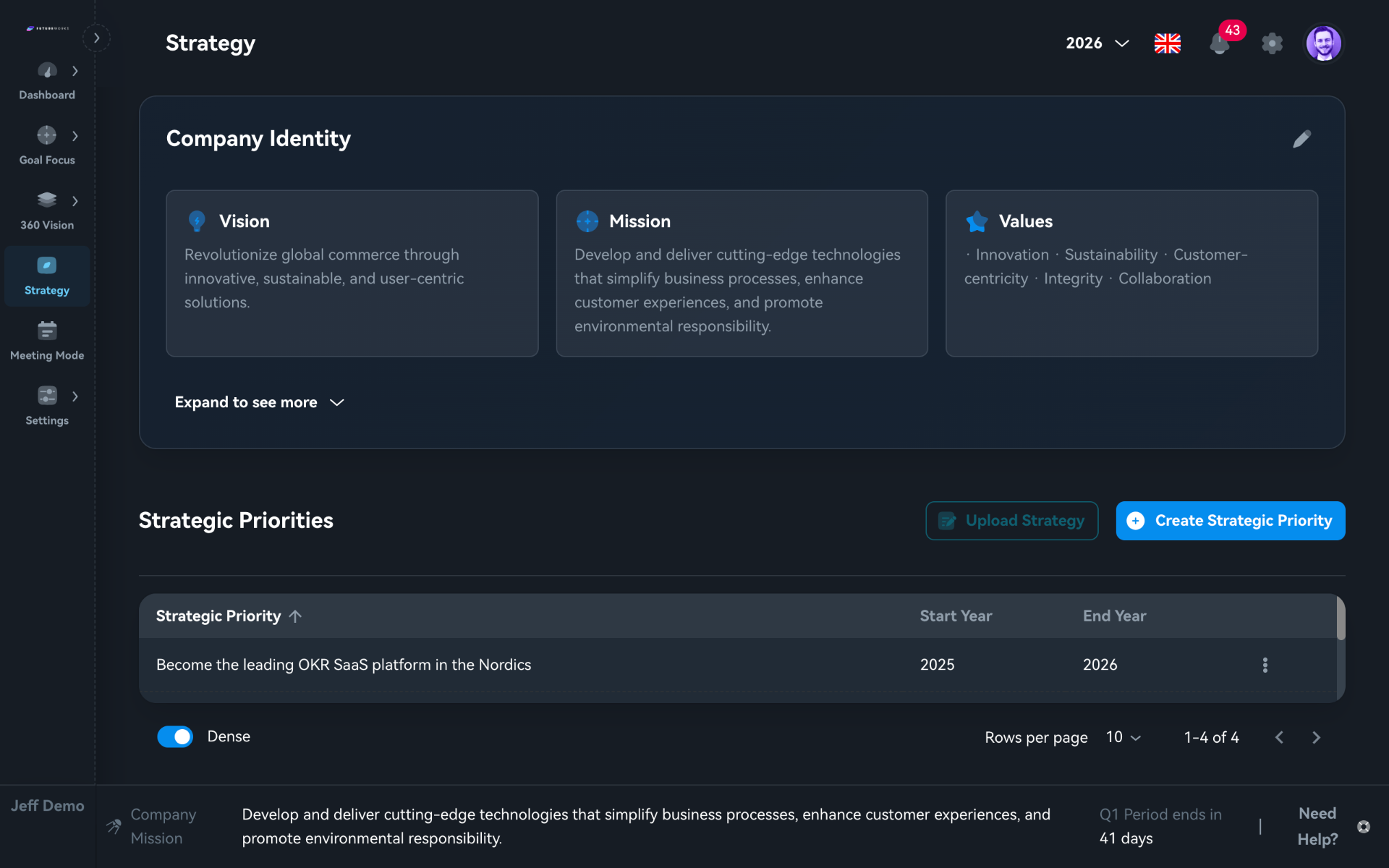
Strategy
Anchor your direction. Make it visible.
Strategy fails when it lives in a PDF no one opens. In Futureworks, Vision, Mission, and Values sit in three cards every employee can see. Build multi-year Strategic Priorities and connect them directly to the OKRs your teams set each quarter.
- Vision, Mission, and Values, visible to everyone, always
- Strategic Priorities with defined start and end years
- Upload existing strategy documents, no rewriting needed
- Expandable view to go deeper on the strategic narrative
Tactical · Goal Focus
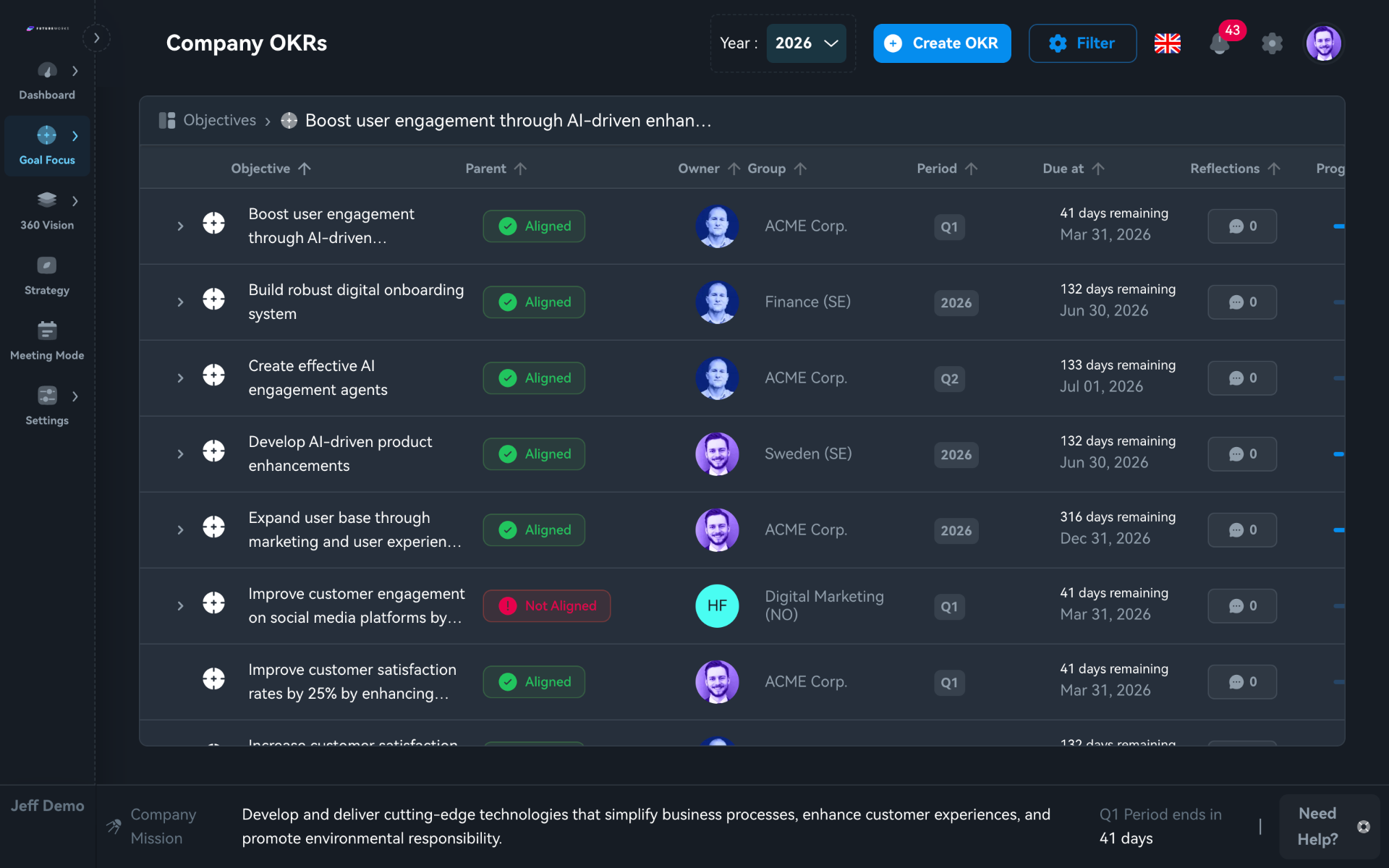
OKR List
Every objective. One view. Nothing hidden.
Leaders get a full-company OKR table showing alignment status, owners, periods, and due dates. Spot unaligned objectives in seconds. Filter by group or period. Drill into any objective to see key result detail.
- Aligned / Not Aligned badges, gaps visible instantly
- Owner avatars with group and department context
- Period and due-date columns to track deadlines
- Create new OKRs directly from the top bar
Strategy · 360 Vision
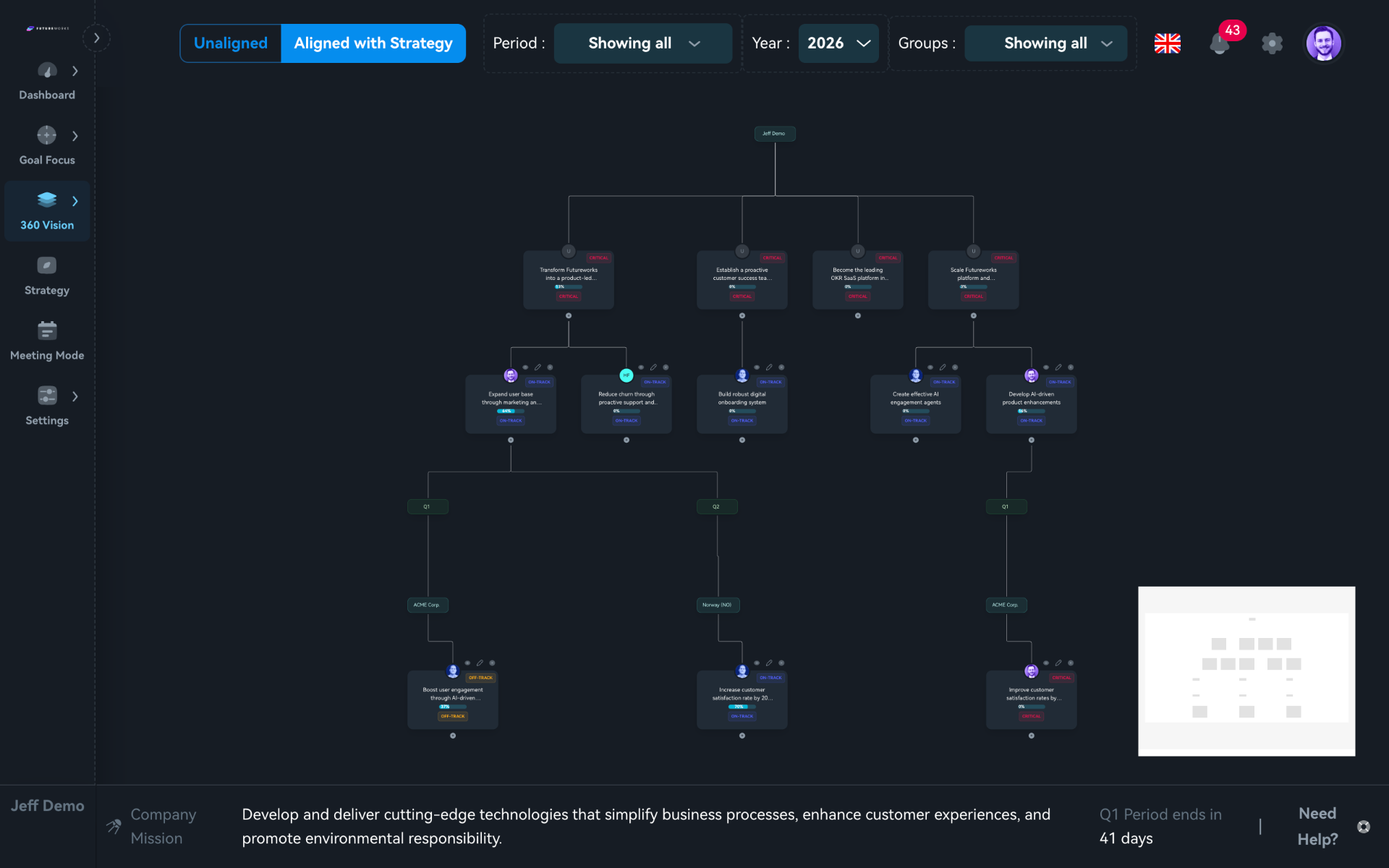
360 Vision
From boardroom to desk. Every connection visible.
The 360 Vision tree maps how strategic priorities branch into departmental OKRs and down to individual objectives. Toggle between aligned and unaligned views to spot gaps. Filter by period, year, or group. Every node carries a colour-coded status badge.
- Hierarchical tree: company → team → individual
- Aligned vs. Unaligned toggle to find gaps fast
- Filter by period, year, and group
- Colour-coded status badges on every node
Operations · Meeting Mode
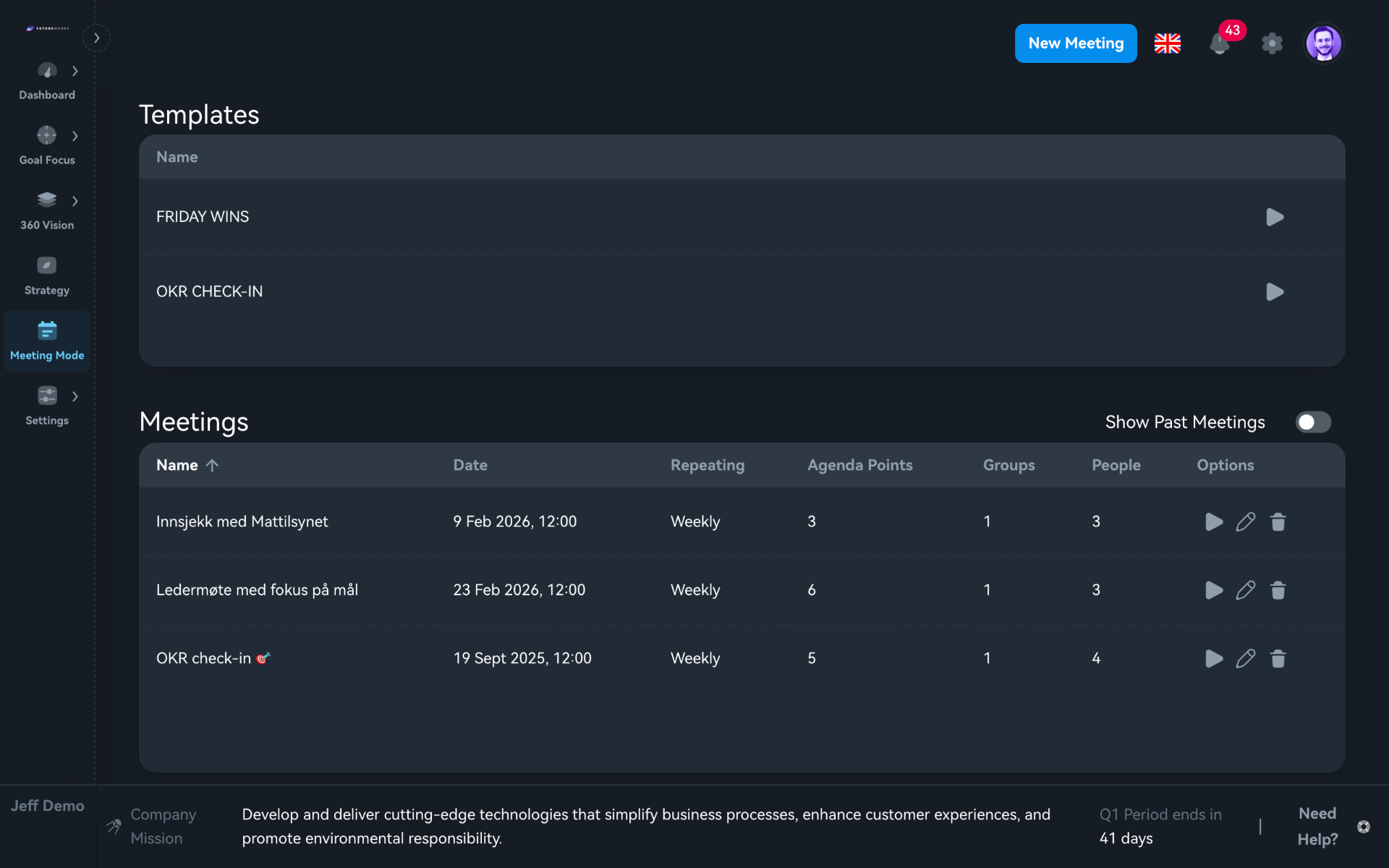
Meeting Mode
Meetings that drive action, not just updates.
Choose a template, OKR Check-In, Friday Wins, and launch. Each agenda point is timed. Each participant gets their spotlight for Good News, OKR status, and actions. Recurring check-ins go from chaotic catch-ups to focused, time-boxed sessions.
- Pre-built templates: OKR Check-In, Friday Wins, and more
- Timed agenda points with live countdown per item
- Good News round, business and personal stories per attendee
- OKR Status and Actions built into every agenda
Tactical · Dashboard
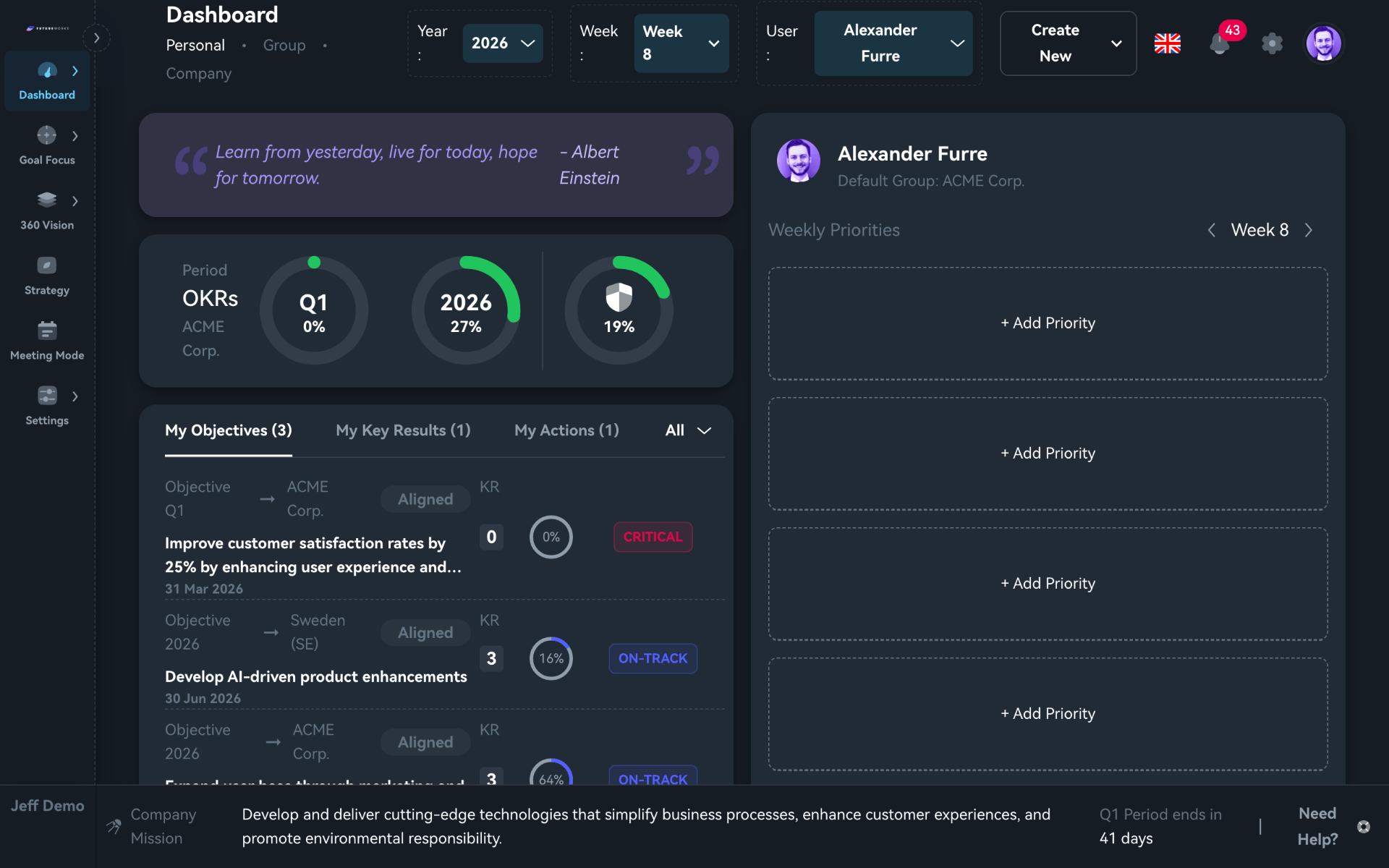
Personal Dashboard
See your week. Own your goals.
Every team member opens to their own dashboard, with progress rings for the quarter and the year, priorities for the week, and a live view of every objective with status and KR counts. No clicking around. No guessing where things stand.
- Progress rings across periods, quarter, annual, and all-time
- Weekly priorities that set the focus before Monday starts
- Live objective list with status badges and KR counts
- A motivational quote to set the tone each week
Testimonials
"Futureworks has transformed how we align our teams. The transparency it brings is invaluable."
Torbjørn Titlestad
"Finally a platform that makes OKRs practical, not just theoretical. Our execution improved dramatically."
Hans Gustavsen
"The meeting mode and check-ins keep everyone accountable. It's become essential to how we operate."
Eileen Thoresen